FoodOS
Your restaurant's own ordering app, kitchen display and delivery app, with no commission on any order.
Customers order delivery, takeaway or from their table on your own Android app or the web, pay by UPI, card or cash on delivery, collect your reward points and watch their food come on a live map. The kitchen works from a display that chimes for every order; your own delivery partners get their runs, directions and a 4-digit code at the door in their own app; and you run the menu, offers, outlets, staff and reports from one admin. It runs on your own server, under your brand, and the customers are yours.
For restaurants, cloud kitchens and small chains in India that want their own online orders instead of paying a commission on every one.
See it work · 2:36
No sound — the captions explain each step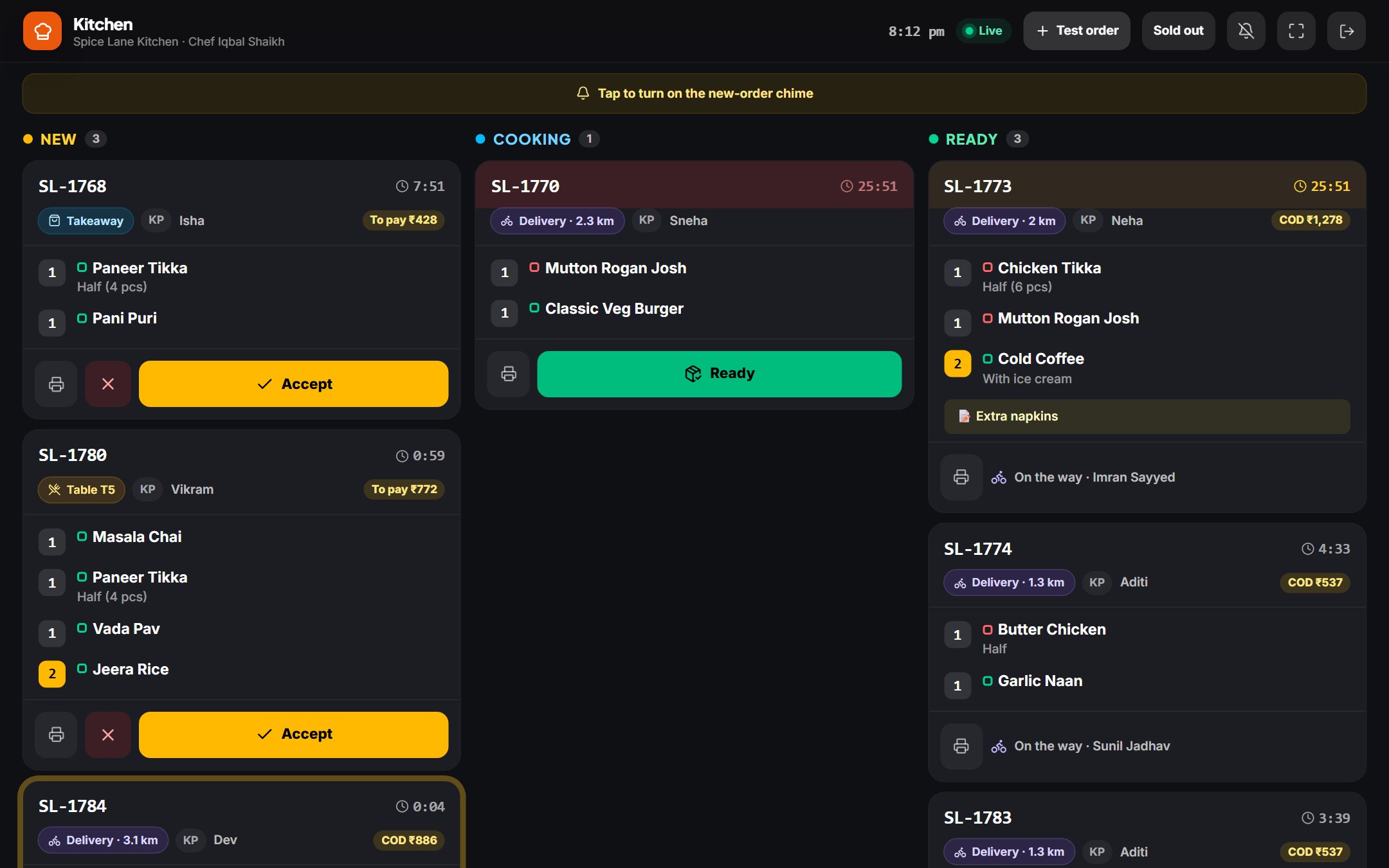
Captured from the demo company, with sample data, November 2026.
What it does
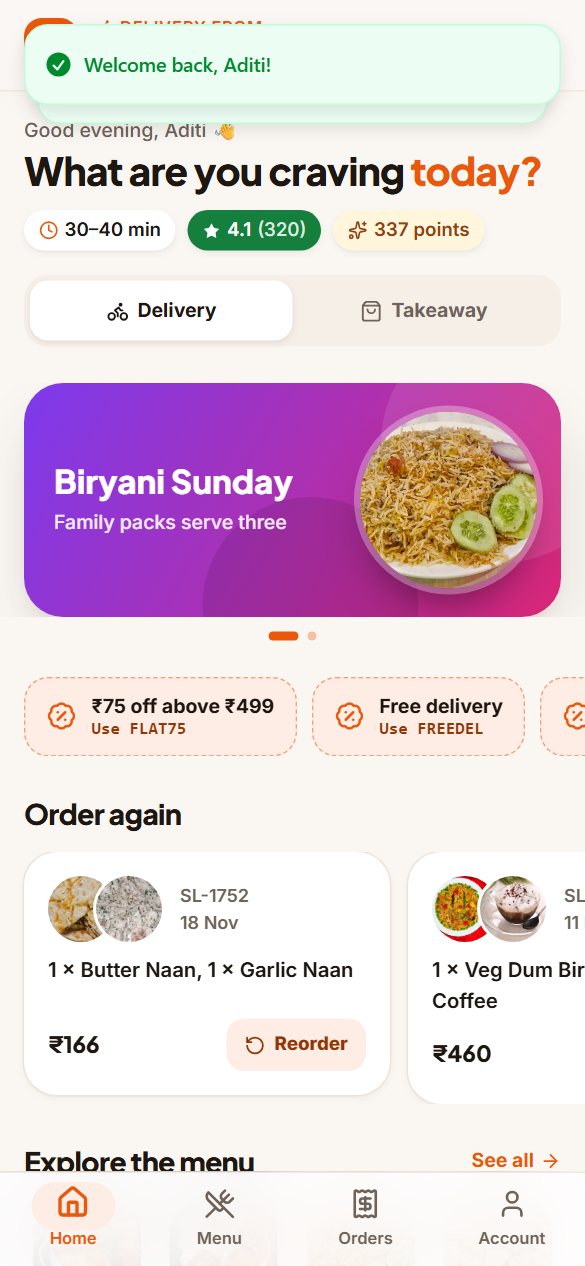
- Customer app
- Home with offer banners, offer codes, reward points and one-tap reorder; a menu with photos, search, a veg-only switch and categories that follow the scroll; veg / non-veg / egg marks, spice, Bestseller and Chef's special tags; sizes and add-on groups priced live; sold-out and breakfast-only dishes shown and blocked. Sign in with a mobile number and an SMS code. Light and dark themes.
- Checkout
- Delivery address on a map with “use my location”, saved addresses, delivery fee by distance, packaging, a GST bill, offer codes with the reason when one doesn't apply, reward points, a tip for the rider, notes for the kitchen. Pay by UPI, card, netbanking or wallet through your own Razorpay account, cash on delivery, or at the counter. Every order is priced again on the server.
- Live tracking
- Each step with its time, the expected arrival, a map with the outlet, the customer's home and the rider moving, the 4-digit delivery code, the rider's name and a call button; cancel before the kitchen accepts; rate and review.
- Table QR ordering
- A QR code on every table: guests order from their phone and pay at the table or online, and the kitchen sees the table number. Printable QR sheets per outlet; a new code for one table in a tap.
- Kitchen display
- New, cooking and ready columns that update every few seconds, a chime for new orders and a reminder when one waits, timers that turn amber and red, items with sizes, add-ons and notes, accept or reject with a reason, sold-out switches per outlet, and kitchen tickets for 80 mm thermal printers.
- Delivery partner app
- Online and offline, location shared while online, runs assigned automatically to the least busy partner when food is ready or taken from “up for grabs”, the address with Google Maps directions, calls, cash to collect, swipe to confirm pick-up and delivery, the customer's code at the door (locked after 5 wrong tries), and the day's runs, cash and tips.
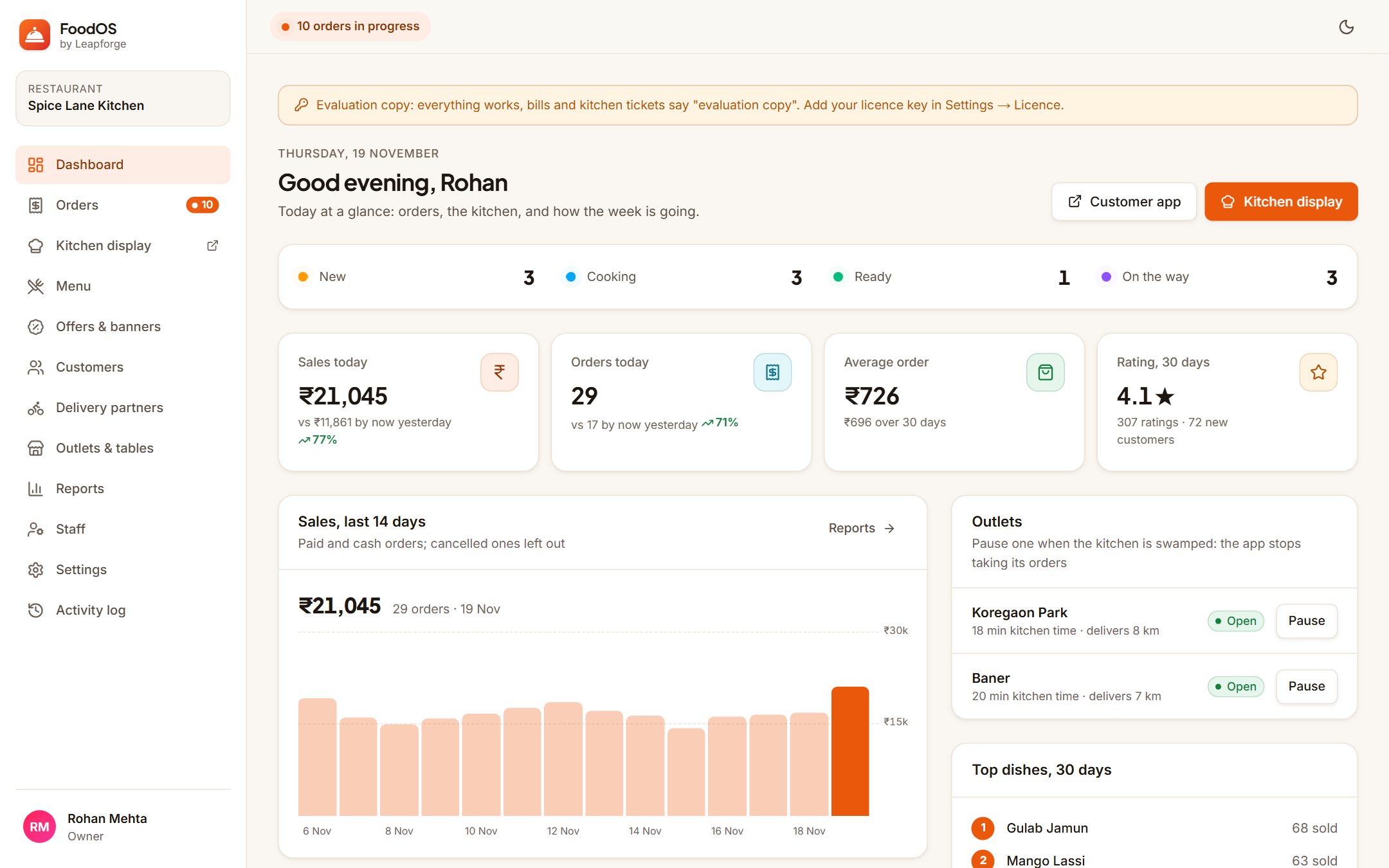
- Orders and the counter
- A live board with accept, ready, assign a delivery partner, mark paid and hand over; cancellations with reasons and points returned; full history with search, filters and a CSV export; each order with its timeline of who did what, the bill and a printable GST bill.
- Menu, offers and customers
- Dishes with photo, sizes, add-on groups, timings and stock per outlet; offers as % off with a cap, ₹ off or free delivery with minimum order, first order only, uses per customer and dates; home-screen banners; your customer list with each customer's orders, favourites and points, goodwill points with a reason, and blocking.
- Outlets
- Several outlets with their own hours (past midnight too), delivery radius, kitchen time, order types, tables, staff and sold-out list; the app picks the open outlet nearest the customer; pause an outlet when the kitchen is swamped.
- Reports
- Today, yesterday, 7 or 30 days, this month or any dates, per outlet: sales, orders, average order, new customers, rating, sales by day, busy hours, top dishes, channels, payments, offers used, and a GST summary of taxable value, CGST and SGST.
- Android apps
- A customer app and a delivery-partner app for Google Play under your name and icon, with a build script and a step-by-step guide. They open your server, so menu and price changes never need an app update.
- Team
- Roles for Owner, Manager, Kitchen, Cashier and Delivery partner, each optionally tied to one outlet. The kitchen can't take payments, refund or change prices, the counter can't refund or change prices, and partners see only their own runs.
- Security
- Customers' addresses, delivery codes and your payment keys encrypted with AES-256-GCM · SMS codes stored only as a keyed hash, with limits · passwords hashed with bcrypt · role and outlet checks on the server for every page and action · payment signatures checked · security headers · audit log · optional encrypted backups.
Tested: 52 automated tests on pricing, the GST bill, delivery fees by distance, coupons, reward points, opening hours past midnight, order steps, delivery codes, encryption, roles and rate limits; 18 end-to-end tests on a production build: a delivery order from the customer's phone through the kitchen display and the rider app to the doorstep code, a table QR order paid at the counter, a new dish with a photo, sizes and add-ons appearing in the app and going sold out, an offer checked at checkout, every admin and customer screen on desktop and phone with each role kept to its own screens, and the security tests (other customers' codes hidden, outlet limits, role limits, the rider's code lock, sign-in code limits, upload checks, the payment webhook, CSV injection).
Questions buyers ask
+Do customers have to download an app?
No. The same app opens in any phone browser from your link or a table's QR code. The Android app is there for regulars who want your icon on their phone.
+Is there a commission per order?
No. You pay for FoodOS once. Online payments go straight to your own Razorpay account, which charges its own fee; SMS codes cost what MSG91 charges you.
+Can we use our own delivery boys?
Yes, that's how it works: they sign in to the delivery-partner app, go online, and get runs when food is ready, with the address, directions, the cash to collect and the customer's code.
+We have more than one outlet. Does it work?
Yes. Each outlet has its own hours, delivery area, tables, kitchen display, sold-out list and staff; customers are sent to the open outlet nearest them, and reports can be per outlet or for all.
+Does it take orders from Swiggy or Zomato?
No. FoodOS is for your direct orders: your app, your website link and your table QR codes, so the customers and the margin stay with you.
+What happens after 12 months?
It keeps working, forever. The 12 months is for updates and support; renewing them is optional.
How buying works
Four steps, no call, nothing hidden.
- 01
Order at the listed price
Fill in the order form: the name the licence should carry, an email, and whether you want installation.
- 02
Pay by UPI or bank transfer
Within one working day we email the payment details and the exact amount. No call, no quote.
- 03
Get your licence and package
Within one working day of payment: the licence key, the Docker package and the installation guide, by email.
- 04
Run it on your own server
Install it yourself with the guide — it is a few Docker commands — or add our installation and we do it for you.
Before you pay
The terms, stated up front.
The price on the listing is the price
No quote, no call, no negotiation. What is included and what is not is written on the listing.
It runs on your own server
Your server, your domain, your data. It checks its licence offline and never phones home to us.
Changes are an ordinary build
The listing says whether source is included. If it needs to do something it does not do, we quote that separately — or tell you if buying was the wrong call.
7 days to change your mind
A full refund within 7 days of purchase if the licence key has not been activated. The full terms are on the refund policy page.
Full terms: refund policy.
FoodOS · ₹49,999
One-time licence · one restaurant brand · all its outlets · unlimited orders, customers and staff · 12 months of updates