ClassOS
Enquiries, admissions, fees, attendance and tests for coaching institutes and tuition centres.
Follow up every enquiry until it becomes an admission, set fee plans with instalments and print numbered receipts, mark a batch's attendance on a phone in seconds, run tests on paper or online with anti-cheating and get ranks and report cards, and give each family a private page with attendance, fees and marks. WhatsApp reminders open with one tap, with no paid messaging service. It runs on your own server, and students' addresses, documents and photos are stored encrypted.
For coaching institutes and tuition centres in India — JEE, NEET, boards or foundation — from one centre to several branches.
See it work · 2:53
No sound — the captions explain each stepOnline tests · 3:08
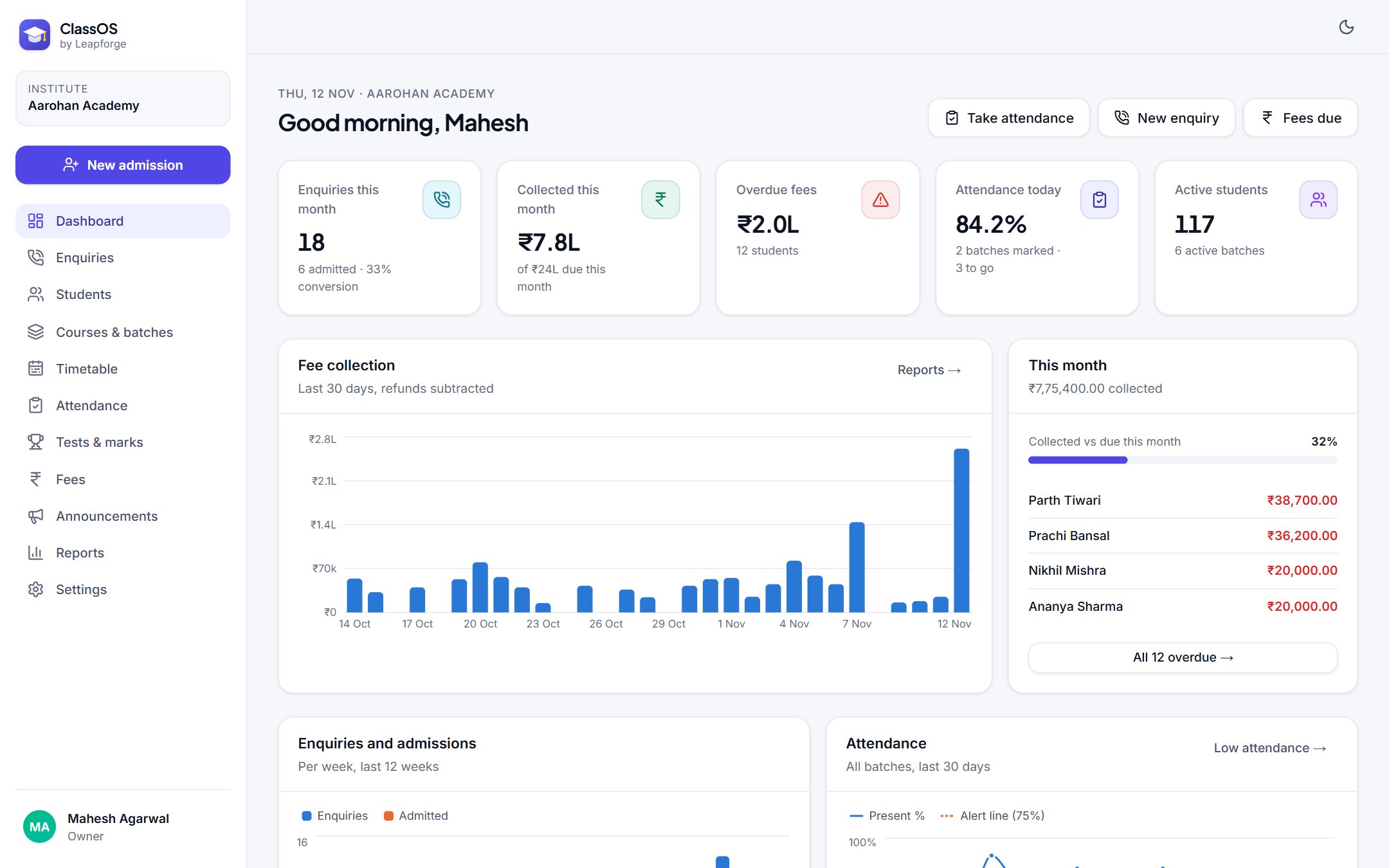
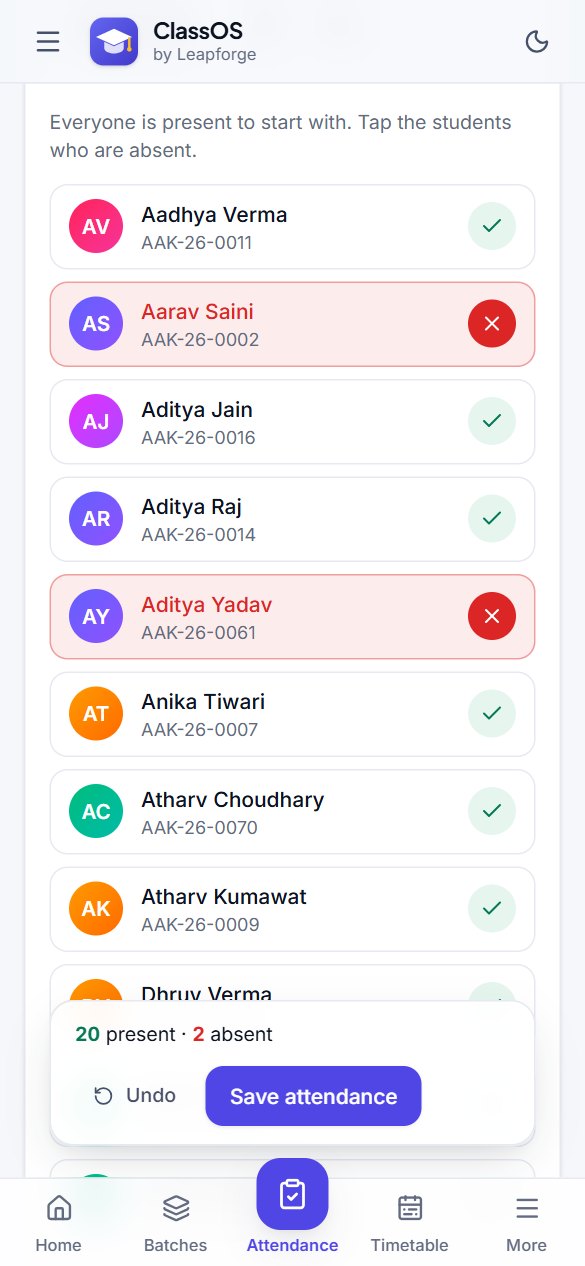
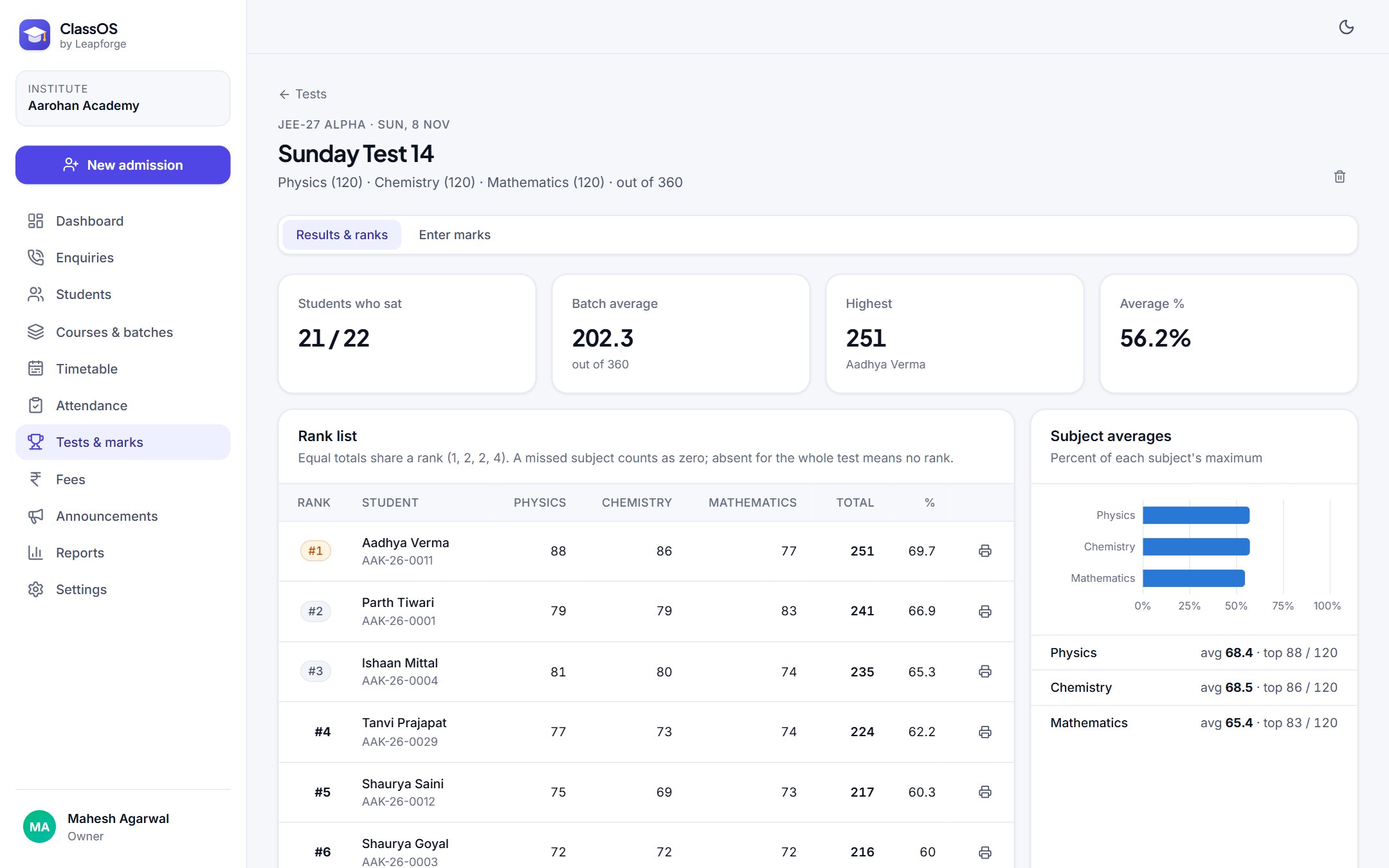
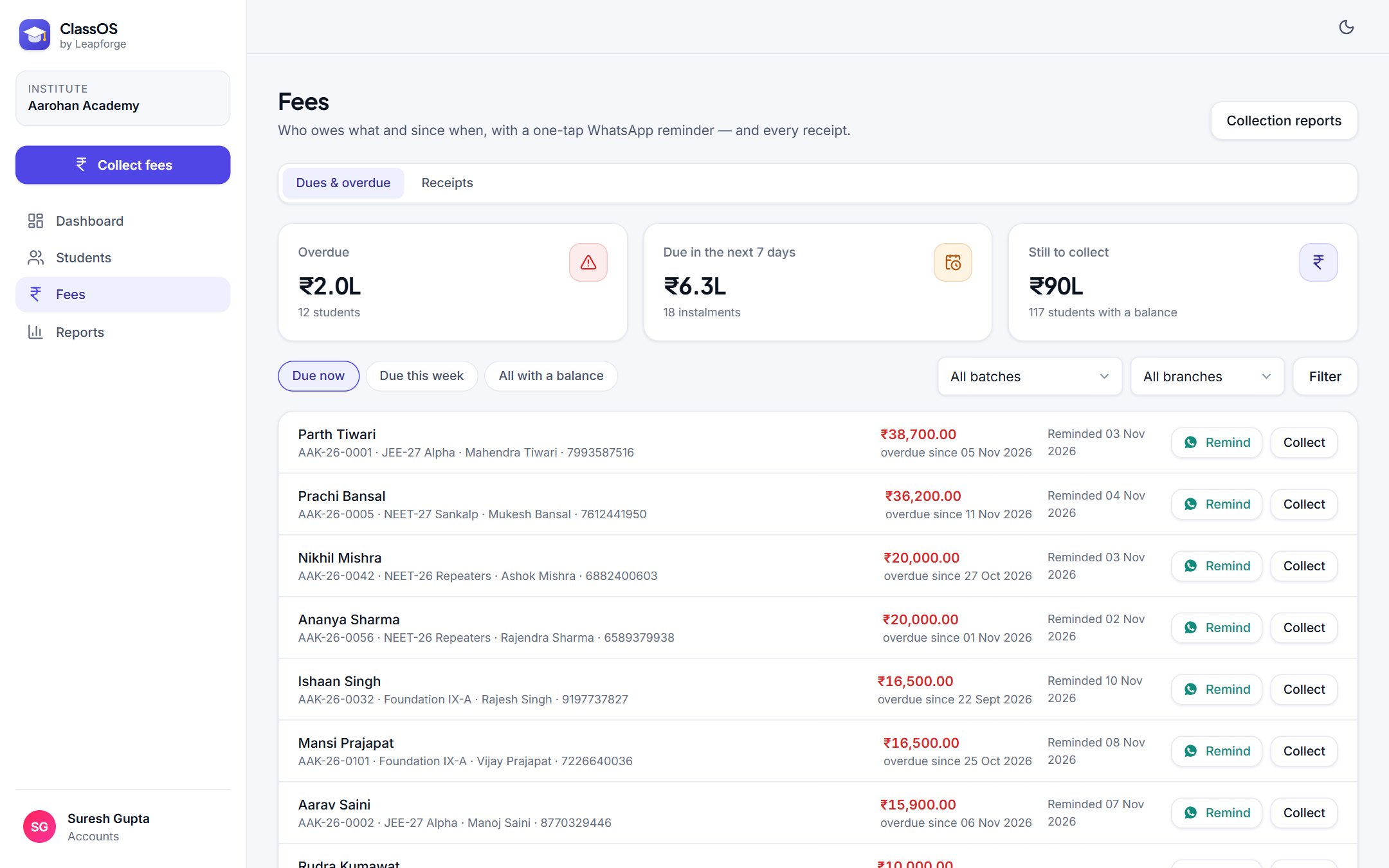
Captured from the demo company, with sample data, November 2026.
What it does
- Enquiries
- Every call and walk-in with its source, course of interest, class and counsellor; a follow-up log with the next date; lists of follow-ups due today and overdue; lost enquiries with the reason; and admission in one step from the enquiry.
- Admissions
- Student profile with photo, date of birth, school and class; up to four parents or guardians with their mobiles; branch, course and batch; admission numbers such as AAK-26-0042; and documents such as marksheets, uploaded as PDF, JPG or PNG.
- Courses, batches and timetable
- Courses with subjects and a standard fee; batches with a branch, a teacher in charge, a room and a capacity that stops admissions when full; a weekly timetable by batch or by teacher that refuses a class clashing with the same batch, teacher or room.
- Fees
- Fee plans from the course fee, with scholarship, sibling, early-bird or staff-ward discounts and their reason; instalments made in one click and editable; receipts numbered per financial year on your letterhead, A5 or A4, with the GST inside the fee shown when you charge it; cash, UPI, card, bank transfer or cheque; refunds with their own numbers.
- Dues
- Overdue and due-this-week lists by branch and batch with how long each has been overdue, and a one-tap WhatsApp reminder to the parent that includes your UPI ID, with the date it was last sent.
- Attendance
- A batch's register on a phone: everyone starts present, tap the absent ones and save. Each student's attendance percentage, the absent students' parents one tap away, and a list of students below your attendance line with a WhatsApp message to the guardian.
- Tests and report cards
- Tests per batch with any subjects and maximum marks, a marks grid that takes AB for absent and negative marking, ranks with ties (1, 2, 2, 4), subject averages and a printable report card per student with every test, rank, class average and attendance.
- Online tests
- Students take a test on their phone or computer from one link, signing in with their admission number and an exam PIN. Six question types: MCQ with one correct option, multi-correct with partial marks, true or false, numerical with an allowed margin, short answers, and written answers such as 150–200 words with a live word count, marked by the teacher. Negative marking, pictures in questions, and questions and options shuffled per student. Anti-cheating: full screen, leaving the test is counted and can submit it automatically, copy and paste blocked, the student's name watermarked, one device per student. A live view for the teacher, a marking queue for written answers, and results that go straight into ranks and report cards.
- Family page
- A read-only page per student behind a private link you send on WhatsApp: attendance, fee instalments and receipts, and test marks with rank. It shows no address, phone numbers or notes, and you can switch it off at any time.
- Announcements
- Write a notice once for a batch, then send it to every family on WhatsApp with one tap each and a progress bar, or copy it into a broadcast list.
- Dashboard and reports
- Enquiries this month and the conversion rate, fees collected against what fell due, overdue fees, today's attendance, classes today and upcoming tests; fee collection by day, branch and payment mode; enquiries by source; attendance by batch; CSV for your accountant.
- Team
- Roles for Owner, Admin (optionally limited to one branch), Counsellor, Teacher and Accounts. Teachers see only their own batches and never fees; counsellors take fees but cannot refund; accounts see money, not marks or personal details.
- Security
- Students' and guardians' addresses, Aadhaar last 4 digits, notes, discount reasons, your bank account number, and student photos and documents encrypted with AES-256-GCM · passwords hashed with bcrypt · role checks on the server for every page and action, so a teacher only reaches their own batches · family links you can switch off · exam PINs encrypted and online-test answer keys kept on the server · login lockout · security headers · audit log · optional encrypted backups · 29 automated security tests.
Tested: 41 automated tests on instalment schedules, dues and overdue, receipt numbering, GST inside fees, attendance percentages, ranks with ties, timetable clashes and the marking of every online question type; an end-to-end test of the whole path from enquiry to admission, fee plan, receipt, refund, attendance, marks, report card, family link and announcement, plus first-run setup; end-to-end tests of an online test from writing the questions to a student taking it, the anti-cheating checks, one device per student, marking and published results; a check of every main screen for every role on desktop and phone; and 29 security tests.
Questions buyers ask
+Do we need a WhatsApp Business API or an SMS plan?
No. Reminders, absence messages, family links and announcements open WhatsApp on the computer or phone with the message already typed, using your own number. Nothing is sent until your staff tap send.
+Can teachers see fees or other teachers' batches?
No. A teacher sees only the batches they are in charge of or teach a class in — their timetable, attendance, tests and marks — and nothing about fees, enquiries or students' personal details. This is checked on the server, not just hidden on screen.
+We have two centres. Is that one licence?
Yes. One licence covers your institute with all its branches. You can limit an admin, counsellor or accountant to one branch.
+Does it handle GST on fees?
If you are registered, turn on GST in Settings and each receipt shows the taxable value and the CGST and SGST inside the fee, with your GSTIN and SAC. Confirm the rate and treatment with your CA.
+Can students cheat in online tests?
It is much harder. The test runs in full screen, every time a student leaves it for another app or tab is counted and shown to the teacher (after a set number of times it submits itself), copy and paste are blocked, questions and options are shuffled per student, and a test continues only on the device it started on. A browser cannot see a second phone or someone sitting next to the student, so treat it as a strong deterrent and a record, not proof.
+What do parents see on their page?
Their child's first name, batch, attendance, fee instalments and receipts, and test marks with rank. Not the address, phone numbers, documents or office notes. The link is long and random, and you can switch it off at any time.
+What happens after 12 months?
It keeps working, forever. The 12 months is for updates and support; renewing them is optional.
How buying works
Four steps, no call, nothing hidden.
- 01
Order at the listed price
Fill in the order form: the name the licence should carry, an email, and whether you want installation.
- 02
Pay by UPI or bank transfer
Within one working day we email the payment details and the exact amount. No call, no quote.
- 03
Get your licence and package
Within one working day of payment: the licence key, the Docker package and the installation guide, by email.
- 04
Run it on your own server
Install it yourself with the guide — it is a few Docker commands — or add our installation and we do it for you.
Before you pay
The terms, stated up front.
The price on the listing is the price
No quote, no call, no negotiation. What is included and what is not is written on the listing.
It runs on your own server
Your server, your domain, your data. It checks its licence offline and never phones home to us.
Changes are an ordinary build
The listing says whether source is included. If it needs to do something it does not do, we quote that separately — or tell you if buying was the wrong call.
7 days to change your mind
A full refund within 7 days of purchase if the licence key has not been activated. The full terms are on the refund policy page.
Full terms: refund policy.
ClassOS · ₹19,999
One-time licence · one institute · all branches · unlimited users · 12 months of updates